Calendar & publishing
Understand your calendar and post statuses
See the whole month, open a post popup, and distinguish approval from actual scheduling.5 min read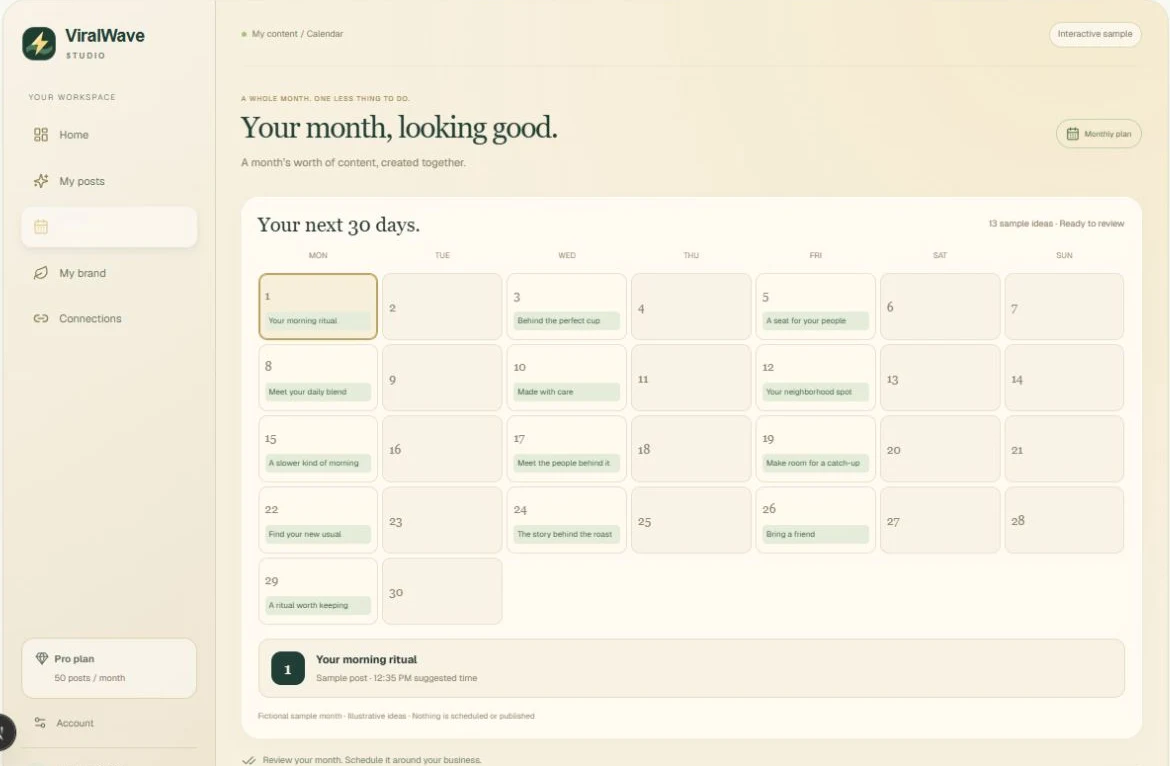
- 01
Open your single calendar
Calendar brings your monthly content and publishing state together. Use the arrows to move between months. If you have more than one saved batch, select the collection you need.
- 02
Read the status, not just the date
Amber means Needs review. Purple means Approved. Blue means Scheduled or Publishing. Green means Published. Red means Failed or Needs attention. Labels accompany the colors.
- 03
Understand planned versus scheduled dates
Planned dates show the intended rhythm. An approved post waiting for connection is not a confirmed scheduled publication. Scheduled means an actual publishing record exists; its time appears in the calendar.
- 04
Click the post you want
Click its title in the calendar to open a popup with the image, caption, status, and review or editing controls. Clicking a day number only selects the day.
- 05
Adjust a publishing date
Where available for an approved post with publishing enabled, choose Adjust publishing date in the preview. Save the scheduling change and confirm its new time.
- 06
Follow the rolling month
Posts are spread over a rolling 30-day content window, which can cross into the next calendar month. Starter posts are spaced more widely; larger plans can have multiple posts on a day.
Helpful tips
- Skipped and saved posts do not publish just because they have a planned date.
- Publishing times vary and use the configured publishing timezone. They are suggestions, not a guarantee of engagement.
- A red failed state needs attention; do not assume it published successfully.
If something doesn’t look right
The calendar shows approved posts but no scheduled status.
Connect a supported destination and enable publishing. If accounts are already connected, finish publishing setup rather than approving again repeatedly.
My posts run into next month.
That is expected for a rolling 30-day window, particularly when you start in the middle of a calendar month. Move forward one month to see the remaining dates.